Prerequisite knowledge
When you are building services, you need a way to protect each user's resources. Authentication checks who the user is. A session or token lets the server recognize later requests without asking for the password again. Authorization checks whether that user is allowed to access a particular resource or perform an action.
Session IDs

A session ID is a random secret generated by the server and associated with a user’s session. The server sends it to the browser in a cookie when you log in. When the browser makes a matching request to a private resource, it includes the cookie, which the backend validates. This system works but can there be a better solution where we do not need to maintain a state or a database record? Enter JWT
JSON Web Token (JWT)
eyJhbGciOiJIUzI1NiIsInR5cCI6IkpXVCJ9.eyJzdWIiOiIxMjM0NTY3ODkwIiwibmFtZSI6IkpvaG4gRG9lIiwiaWF0IjoxNTE2MjM5MDIyfQ.SflKxwRJSMeKKF2QT4fwpMeJf36POk6yJV_adQssw5c
JSON Web Token (JWT) token follows similar flow diagram to Session like after authentication instead of sending session id in cookie we send a JWT token and for other subsequent requests, this token is used to authorize the user. The key difference here is instead of storing session ids in database we store all the necessary user's info in the token itself. JWT token consists of 3 parts:
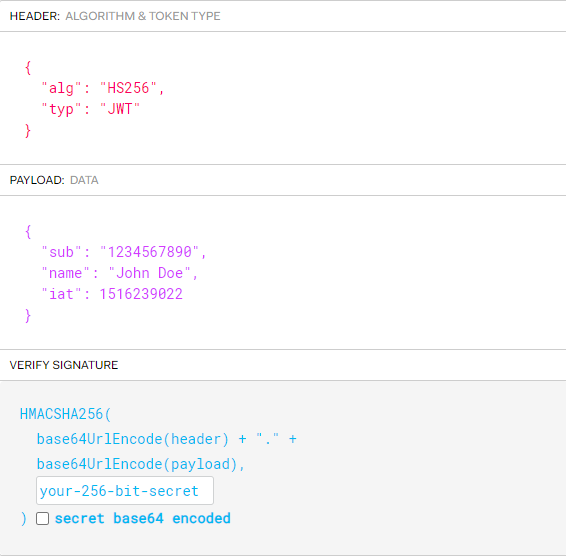
A signed JWT in compact form has three Base64url-encoded parts separated by dots: header, payload and signature. Encoding is not encryption, so don’t put secrets in the payload. JWTs can use HMAC or asymmetric signatures; the server must verify the signature and relevant claims, including issuer, audience and expiry, before trusting the token.
JWTs are "stateless", which unlocks some benefits like:
- No re-login required for separate services, as same JWT token can be used to authorize when each service has the appropriate trusted verification keys and validates the token’s issuer, audience and expiry. The data is stored in client JWT's payload and not in a particular service's database.
- Tokens are stored on the client, that's really the important thing about JWT so no matter if there is load balancer or multiple micro services, the user can authenticate with any of those servers when they have the appropriate trusted verification keys and validate the relevant claims.
Deleting the browser’s copy does not revoke an already-issued JWT. Immediate revocation needs an additional server-side check; otherwise the token remains usable until expiry. Tokens accessible to JavaScript can be stolen through XSS, while cookie-backed requests need protection against CSRF.
All this leads to the gist of this post, following a better approach of having 2 tokens - one short lived access token and another long lived refresh token.
Introduction to short lived token
An access token is used for protected API calls, while a refresh token can obtain a new access token. Access tokens should be short-lived. Refresh tokens usually last longer, but their lifetime, expiry and revocation policy depend on the application’s risk. Neither token has to be a JWT.
Where to store the token?
So now the question comes what is the benefit of having access token if we can generate it from refresh token.
LocalStorage
Storing JWT tokens in local storage can leak the token in an event of an XSS attack as hacker can run arbitrary JavaScript code which can provide them access to in-memory variables and localStorage
Cookies
Storing token's in cookie can lead to CSRF attack which can make user perform a private action without knowing (or knowing when it's too late) like phishing user to perform /account/delete
Keeping the access token in memory and the refresh token in a Secure, HttpOnly cookie is one option, not a complete security solution. Protected API calls should require the access token explicitly. Cookie-backed refresh and logout endpoints still need CSRF defenses, such as appropriate SameSite settings plus CSRF tokens or origin validation. HttpOnly prevents JavaScript from reading the cookie, but an XSS attacker can still make authenticated requests, including refresh requests.
Memory
In-memory!! What if user refresh the webpage or re-open the browser? access token will not be available!
In such cases, since refresh token would still be there in cookie we can use it to perform a silent refresh of access token.
Server's database
Stateless access-token verification does not mean the whole authentication system must be stateless. Keeping refresh-session records lets the server revoke sessions and detect refresh-token reuse. Revoking a refresh token prevents new access tokens, but an already-issued access token may remain valid until it expires unless the API performs an additional revocation or account-status check.
Silent Refresh
Silent refresh is a mechanism to generate new access token from refresh token automatically in the event of browser refresh or when access token is expired but refresh token is available and valid. According to Hasura's guide this is handled at the client side. Client makes very first request to /refresh_token as the website loads. The client can refresh before expiry or handle an expired-token response by refreshing and retrying once.
The BAD way
The middleware approach below is an example of what not to do. Use a dedicated refresh endpoint rather than letting the refresh cookie authorize ordinary protected-resource requests. Use POST and protect cookie-backed requests against CSRF. Initiating the request from client-side JavaScript does not, by itself, make the flow safe.
On server, having a middleware IsLoggedIn whose purpose is to validate the JWT and authorize access. Now, instead of just checking for access token, it also look for refresh token when access token is missing or invalid. IsLoggedIn middleware can generate new access token from the details in token's payload and return the new-access-token in response header. Client can implement an interceptor to update value of in-memory access token.
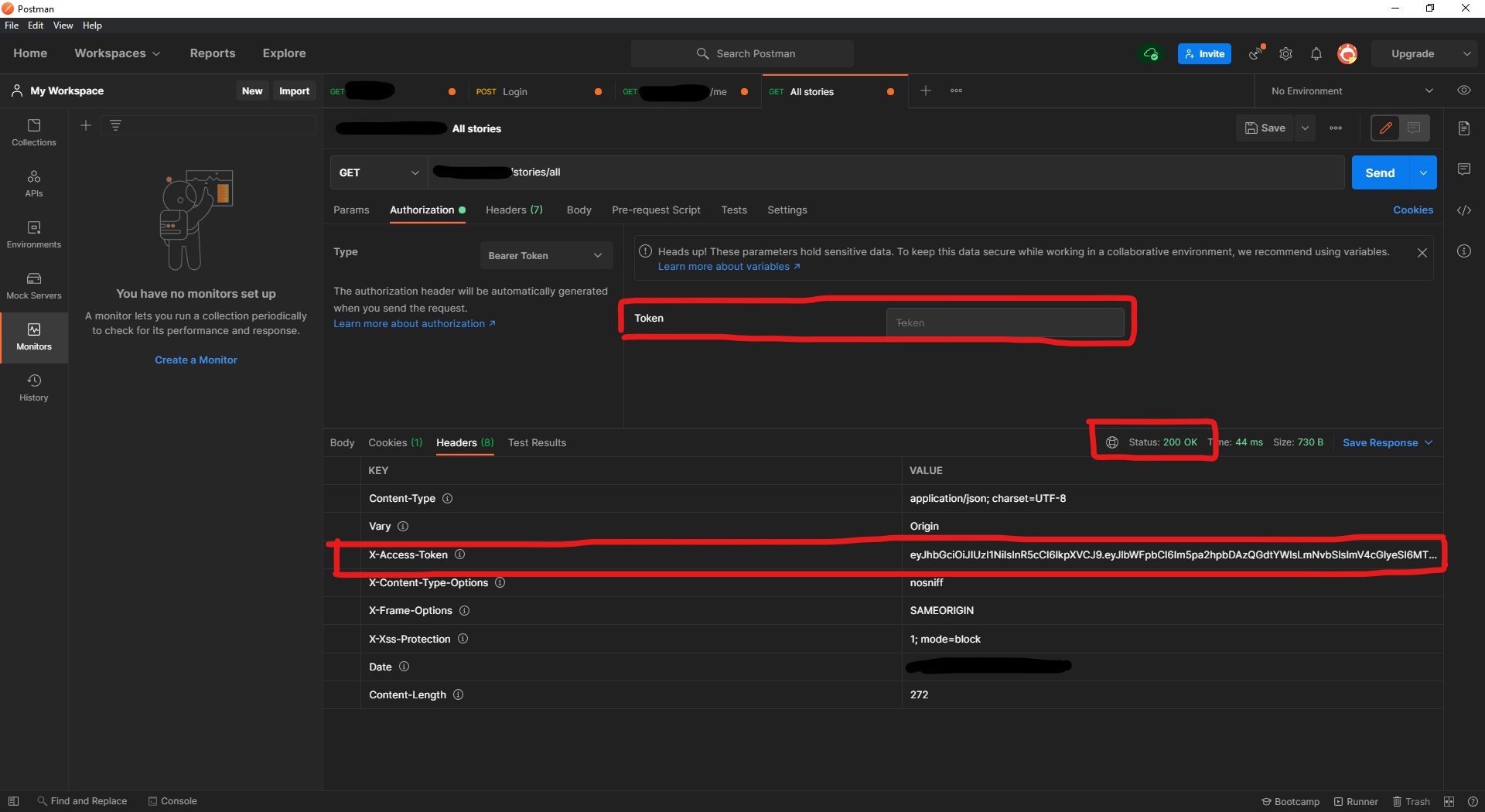
From the image above I want you to notice 2 things:
- Success response on a private resource without providing access token (aka simulating browser refresh)
- Getting new x-access-token in headers using refresh token which was provided via cookie.
The Hasura's (GOOD) way
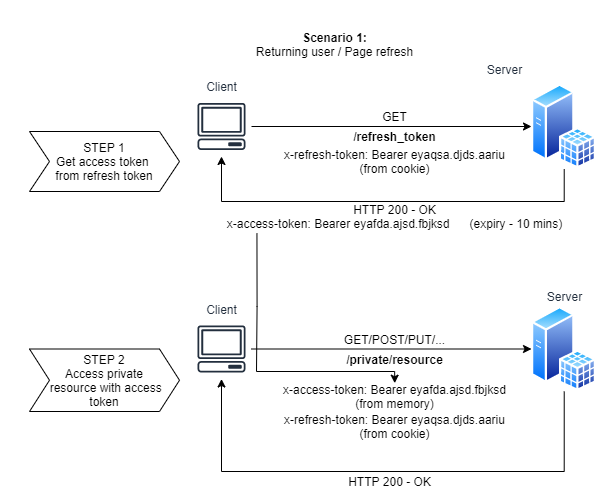
Scenario 1: Page refresh
Refreshing the page clears the access token stored in memory. On page load, call the dedicated refresh endpoint to obtain a new access token. The diagram below shows the two-step flow.
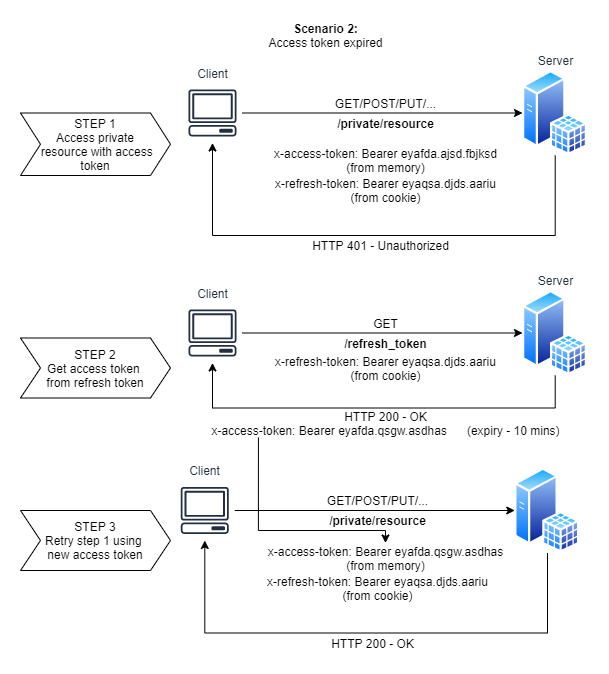
Scenario 2: Access token expired
An expired access token should cause the API to reject the request. The client can then call the dedicated refresh endpoint and retry the original request once with the new access token. Alternatively, it can schedule a refresh shortly before expiry, while still handling expired-token responses. Coordinate concurrent refresh attempts, and return to login if refresh fails.
References:
https://www.youtube.com/watch?v=iD49_NIQ-R4
https://hasura.io/blog/best-practices-of-using-jwt-with-graphql
This had been a great learning lesson for me which I would have not learned if I used any 3rd party library.
Security update — 9 November 2026
This May 2021 article has been corrected to distinguish authentication from authorization and clarify token validation, CSRF, XSS and refresh-session revocation. Current OAuth guidance published in January 2025 requires public-client refresh tokens to use sender constraint or rotation; see RFC 9700 §4.14. This is updated guidance, not a claim about the original implementation.
Further references: OWASP Authorization, OWASP Session Management, JWT specification, JWT security best practices, and OAuth refresh requests.